GoHighLevel Memberships and Courses: Turn Your Know-How Into Recurring Revenue (2026 Guide)
Last updated: October 2026.
GoHighLevel memberships and courses let you sell and deliver an online program from the same platform that already captures your leads, sends your emails and takes payments. For coaches, consultants, clinics and agencies, that means no separate course platform, no Zapier glue and one record per customer showing everything they've bought and watched.
Some links below are affiliate links — if you sign up through them, Pivot 2 Thrive may earn a commission at no extra cost to you. It never changes what we recommend.
Key takeaway: In GoHighLevel, you build a course as a product with modules and lessons, attach it to an offer, sell it through a funnel, invoice or Text2Pay link, and grant access automatically on payment. Workflows then handle onboarding, drip content, nudges for inactive members and renewals, all from your CRM.
On This Page
I'm Dr Priya Jaganathan — Go High Level Certified Admin, Certified AI Tech Stack Consultant and keynote speaker. I've built membership areas and course funnels for Australian coaches, allied health practices and agencies, and this is the setup order I use to get a program live without rebuilding it later.
What GoHighLevel Memberships and Courses Are
GoHighLevel memberships and courses are a built-in learning portal where you host video lessons, downloads and quizzes behind a login. Each course is a product; each way of selling it is an offer.
Because it lives inside the CRM, every enrolment creates or updates a contact. You can tag buyers, track lesson completion and trigger workflows when someone finishes a module or stops logging in.
It also supports a branded client portal and mobile app access, so members don't need to remember yet another login for a third-party platform.
Why Running Courses Inside Your CRM Pays Off
Online learning is a large and growing market in Australia. IBISWorld estimates the Australian online education market at $12.2 billion in 2025, up 4.4% on the previous year.
Most small businesses already have the knowledge to package: onboarding training for clients, a self-paced version of a workshop, or a recorded program for people who can't afford one-to-one work.
The usual problem is tool sprawl. A course on one platform, payments on another and emails on a third means broken data and manual fixes. Keeping it in HighLevel puts leads, payments, access and follow-up in one place.
It also creates a low-ticket entry point. Prospects who aren't ready for your done-for-you service can buy the course, and your smart lists can show you which buyers are ready for the next step.
How to Set Up a GoHighLevel Membership: 7 Steps
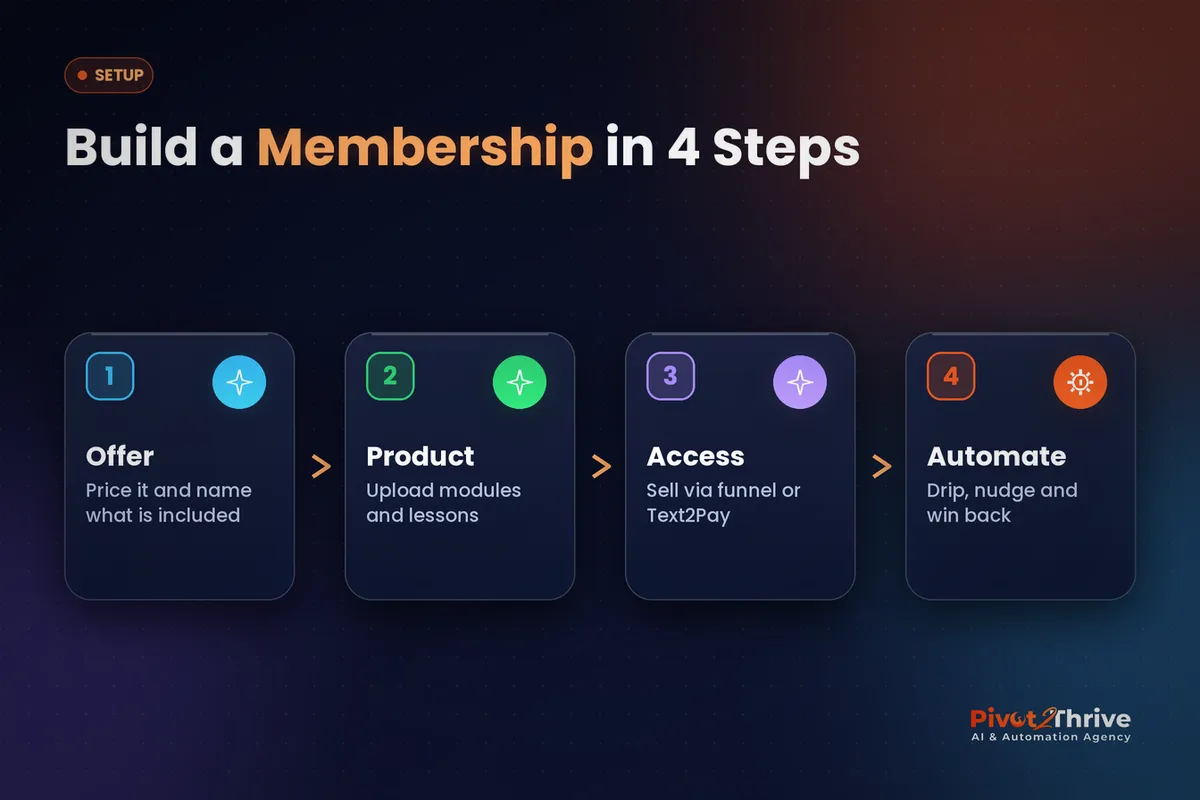
Follow this order. Building the offer before the product saves you from restructuring lessons once you've decided how to sell them.
1. Define the offer first. Decide who it's for, the outcome, the price and the format: one-off payment, payment plan or monthly subscription. Write the promise in one sentence. If it doesn't fit in a sentence, the course is too broad.
2. Create the product. In Memberships, create a product and add categories (modules) and posts (lessons). Keep lessons short — five to twelve minutes works well — and attach worksheets or templates as downloads.
3. Set drip and lock rules. Release modules on a schedule (for example, one a week from enrolment) or lock them until the previous lesson is complete. Drip keeps people engaged and reduces refund requests from people who binge and leave.
4. Brand the portal. Add your logo, colours and a custom domain or subdomain such as learn.yourbusiness.com.au. Use custom values for your business name and support email so you update them once — our custom values guide explains how.
5. Choose how people pay. Attach the offer to a funnel order form for public sales, or send a payment link by SMS for warm leads. If you sell after a call, Text2Pay invoices let you grant access the moment they pay. The funnel builder guide covers the sales page itself.
6. Automate access and onboarding. Build a workflow triggered by the purchase or offer access: grant the offer, send the login email and SMS, tag the contact, and add them to a welcome sequence. Add a second workflow that removes access when a subscription is cancelled or a payment fails.
7. Add engagement nudges. Trigger a reminder when a member hasn't logged in for seven days, congratulate them when they finish a module, and invite completers to book a call for your premium service. This is where a course becomes a sales channel.
| Pricing model | Best for | HighLevel setup | Watch out for |
|---|---|---|---|
| One-off payment | Short, outcome-based courses | Offer with single price on a funnel order form | No recurring revenue unless you upsell |
| Payment plan | Higher-priced programs | Offer with instalments | Remove access automatically on failed payments |
| Monthly membership | Ongoing training, templates, community | Subscription offer plus drip content | Needs fresh content every month to limit churn |
| Free course | Lead generation | Free offer granted from a form | Follow up quickly or it becomes a dead list |
Before launch, buy your own course with a test card or 100% coupon and check every email, link and lock rule as a member would see it.
Want your membership built and automated properly? Book a call with Pivot 2 Thrive and we'll plan the offer, portal and workflows with you.
Not on HighLevel yet? Start with a free 30-day trial — enough time to build everything in this guide before you pay a cent.
An Australian Example: A Sydney Practice Selling an Online Program
Imagine a physiotherapy practice in Sydney's Inner West that runs a popular in-clinic back-care class but can only fit 12 people per session.
They record the class as a six-module online program, sell it for a one-off fee through a HighLevel funnel, and release one module per week. Clinic patients get a discount code by SMS after their appointment.
A workflow nudges members who stall, and anyone who finishes the program gets an invitation to book a one-on-one assessment. The course becomes a feeder for higher-value appointments, not a separate side business.
Agencies can use the same pattern. If you publish educational videos — see our guide to YouTube for AI agencies — your best videos can become the lessons in a paid program. Agencies running SaaS mode can also package courses into client sub-accounts.
5 Membership Mistakes to Avoid in GoHighLevel
- Building the course before the offer. You end up reshuffling modules when you decide on pricing and drip.
- Forgetting the revoke workflow. Cancelled subscribers keep access unless you automate removal.
- Long, unedited lessons. Hour-long recordings kill completion rates. Cut them into short, single-topic lessons.
- No GST setting. If you're registered for GST, set up tax correctly on your products so invoices and receipts are compliant.
- Selling and then going silent. Without onboarding and nudges, members drift off and don't renew.
Frequently Asked Questions
Does GoHighLevel include memberships and courses?
Yes. Memberships and courses are built into HighLevel, so you can host lessons, sell access through funnels, payment links or invoices, and automate onboarding with workflows. You don't need a separate course platform.
Can I charge a monthly subscription for a GoHighLevel membership?
Yes. Create an offer with recurring pricing, connect your payment processor such as Stripe, and use workflows to grant access on payment and remove it if a subscription is cancelled or a payment fails.
How do I drip course content in GoHighLevel?
Set drip rules on each module so it opens a set number of days after enrolment, or lock lessons until the previous one is completed. Drip keeps members engaged and encourages them to finish the program.
Can members access GoHighLevel courses on mobile?
Yes. Members can log in through a browser on any device, and HighLevel also offers a client portal app experience, so members can watch lessons on their phone.
Do I need to charge GST on online courses in Australia?
If your business is registered for GST, online courses sold to Australian customers generally include GST. Configure tax on your products in HighLevel and confirm your situation with your accountant.
Can an agency sell courses to clients inside GoHighLevel?
Yes. Agencies can build a course in a sub-account and share it via snapshots, or run training for their own clients from the agency's account. It is a common way to add a low-ticket product alongside done-for-you services.
Ready to launch your program? Book a strategy call with Pivot 2 Thrive and we'll help you turn your expertise into a membership that sells and onboards itself. Explore more at pivot2thrive.com.au.
New to HighLevel? Try it free for 30 days and build your first course before you pay.
Related Articles
Services
- PowerPivot Leads Pro: AI lead generation and follow-up
- AI Receptionist Agent: answer every call, 24/7
Keep reading
- GoHighLevel Funnels: Build a Landing Page That Books Calls in One Afternoon
- GoHighLevel Invoices and Text2Pay: How to Get Paid Faster
- GoHighLevel Smart Lists: How to Segment Your Contacts
- GoHighLevel SaaS Mode for Australian Agencies
- YouTube for AI Agencies: How I Would Use Video to Book Australian Clients
Everything else
